
Also available in Spanish: leer en castellano.
It started with a trip and a pile of photos.
I came back from a holiday with friends and a lot of photos that everyone wanted. The usual options all failed in the same boring ways. Email attachments bounce. Free file-transfer services cap the size of what you can send and delete the link after a while, usually right before someone finally gets around to downloading it.
What I wanted was almost embarrassingly simple: a link that works, for as long as I want, for files as big as I need, on a server that belongs to me. So I built it. That is Tossbox: a small, self-hosted service where you upload a file from a password-protected panel and get a direct, public download link back. No size limits except the ones you choose, no expiry date except the one you choose, no account for the person on the other end.
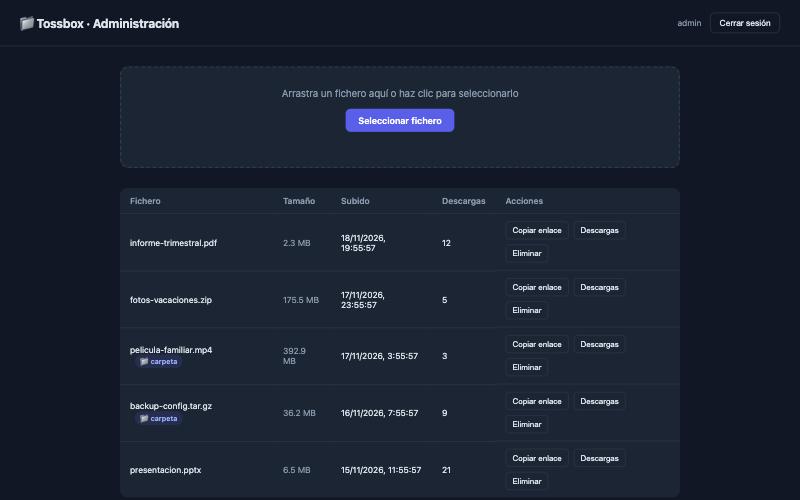
It runs in a single Docker container, keeps everything in one folder, and has no native dependencies, so the same image runs on amd64, arm64 and armv7: a Raspberry Pi, an Apple Silicon Mac or an ordinary Linux server.
What it does
- Admin panel with login: upload, list, copy the link, delete.
- Direct links (
/d/<uuid>): public, no login for the person downloading, and the original file name is kept. - Download history per file: date and IP of the last 200 downloads, plus a counter.
- Watch folder: drop a file into
data/watch/and it is published automatically, once its size has stopped changing so a half-copied file is never registered. - Telegram bot (optional): a notification for every download, and commands to check status, list, delete or upload files from the chat.
- Automatic HTTPS with Let’s Encrypt, through an included variant that puts Caddy in front of the app.
- Sensible login protection: per-IP rate limiting, session regeneration, timing-safe comparisons, and database writes that cannot leave a half-written file behind.
Try it
With Docker installed:
docker run -d \
  --name fileshare \
  -p 3000:3000 \
  -v ./data:/app/data \
  -e ADMIN_USER=admin \
  -e ADMIN_PASSWORD=change_this \
  -e SESSION_SECRET=a_long_random_string \
  -e BASE_URL=http://localhost:3000 \
  mgoreiro/fileshare:latest
Open http://localhost:3000, log in, and upload something. The repository includes a docker-compose.yml and a second one with Caddy and automatic HTTPS if you want to expose it to the Internet. A note on names: the project used to be called FileShare, and the repository, the Docker image and the container still are, so existing installs keep working.
Standing on good shoulders
Tossbox is a thin layer over excellent open source work: Node.js and Express for the server, Caddy and Let’s Encrypt for HTTPS, and the maintainers of the many small libraries it relies on. Thank you.
A companion for the HTTPS variant
If you use the Caddy variant, there is a separate terminal tool I wrote to look after that Caddy: caddy-tui. It is optional and Tossbox does not need it.
The code is on GitHub under the MIT license, and the image is on Docker Hub. Issues, ideas and pull requests are welcome.
Remember that anyone who has a link can download the file, and that a watch folder bypasses the login by design: protect the folder like you protect the panel.