
Also available in Spanish: leer en castellano.
There is a quiet pleasure in a well-kept media library. Every movie called what it is, every episode where it belongs, the posters and summaries appearing on their own as if the machine had read your mind. And there is a quiet misery in the opposite: a folder of files called the.matrix.1999.1080p.bluray.x264-GROUP.mkv that nothing knows what to do with.
For years I fixed that with FileBot. It is a paid product, and a great one, and I want to say so plainly. But somewhere along the way I noticed I was using a tiny fraction of everything it can do. I needed one thing, done well, without a manual: take a pile of files, find out what they really are, and give them names that Plex and Jellyfin understand. So I decided to build something that fitted what I needed, and what I suspect a lot of other people need too.
That is MediaRenamer: a native macOS app, written in SwiftUI, that does exactly that and nothing more.
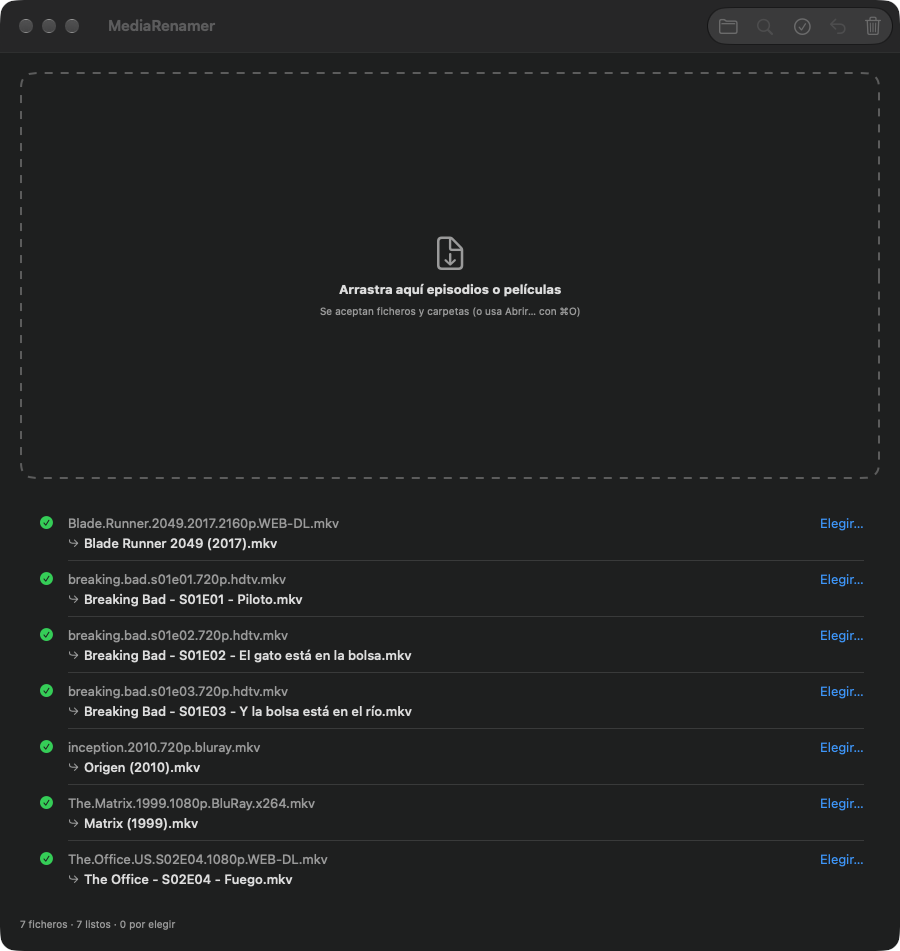
Drag, check, rename
You drag in files or whole folders. The app reads each name, looks the title up on TMDb, and proposes the right one, with the official title, the year and, for series, the title of each episode. You look it over, press a button, and the files are renamed, in the same folder where they already were. It never moves anything or builds a tree of subfolders behind your back.
The.Matrix.1999.1080p.BluRay.x264.mkv          →  The Matrix (1999).mkv
breaking.bad.s01e02.720p.hdtv.mkv              →  Breaking Bad - S01E02 - Cat's in the Bag....mkv
What it does for you
- It matches by itself when it is sure. A single result, or one with an exact title and a compatible year, is marked ready. Anything ambiguous waits for you, with a picker and a manual search.
- It takes a TMDb link. If a file is hopeless, paste the link of the right movie or series and it will believe you, and warn you if a season or episode is missing.
- Subtitles come along.
.srt,.assand their relatives are renamed together with the video. - Series are propagated. Choose the match for one episode and the rest of that series follows.
- It can undo. One button puts every name back, and if something fails halfway, it rolls itself back. If two files in a batch would end up with the same name, it renames neither.
- It understands awkward names:
S01E02,1x02, multi-episode files, disc rips withDISC 1and_T03, and running episode numbers likeCap 34, which it turns into the right season and episode.
The API key lives in the macOS Keychain, not in a file, and the app does everything with a few requests per series, cached, so it is quick and polite to TMDb.
Try it
Download the .dmg of version 1.2 from the releases page, drag the app to Applications, and the first time open it with right-click and Open, because it is signed ad hoc rather than with a paid Developer ID. You will need macOS 13 or later and a free TMDb API key, which takes a minute to get. The interface is in Spanish for now.
If you also make your own copies of discs, it pairs nicely with transcodex: one makes the files, the other gives them their proper names.
Standing on good shoulders
MediaRenamer would be nothing without TMDb and its community of contributors, who keep an extraordinary open database of movies and series, and without the naming conventions that Plex and Jellyfin made a de facto standard. And it exists because FileBot showed what a good renamer looks like. This is a small, independent project, not affiliated with any of them, and this product uses the TMDb API but is not endorsed or certified by TMDb.
The code is on GitHub under the GPL-3.0 license. Issues, ideas and pull requests are welcome.