
Also available in Spanish: leer en castellano.
A while ago I wrote about MediaRenamer, the little app that puts names on my movies and series. It solved a problem I had been putting off for years, and the moment it worked I looked across the room, at the other shelf of the library, and thought: the music is exactly the same.
Anyone who has kept a music collection for long enough knows the feeling. Albums ripped in 2004 with the artist spelled three different ways. Tracks called Track 01. A folder with no cover, another with four, a Thumbs.db left behind by a computer you no longer own, a playlist in a format nothing reads any more. The music is all there; it just does not know who it is. And a library that does not know who it is makes a poor Navidrome.
So, the same way a video collection needs its names put right, a music one needs its tags, its folders and its covers put right. That is NaviMusic: an organiser for music libraries, made for Navidrome, with MusicBrainz as its source of truth.
Five tabs, one tidy library
- Library: your collection as a tree, artist then album then tracks, with a filter to find anything in seconds.
- Playlists: finds every
.m3u,.pls,.wpl,.xspfand relative hiding in the tree, and lets you delete the ones you no longer want. - Covers: spots the albums that have no
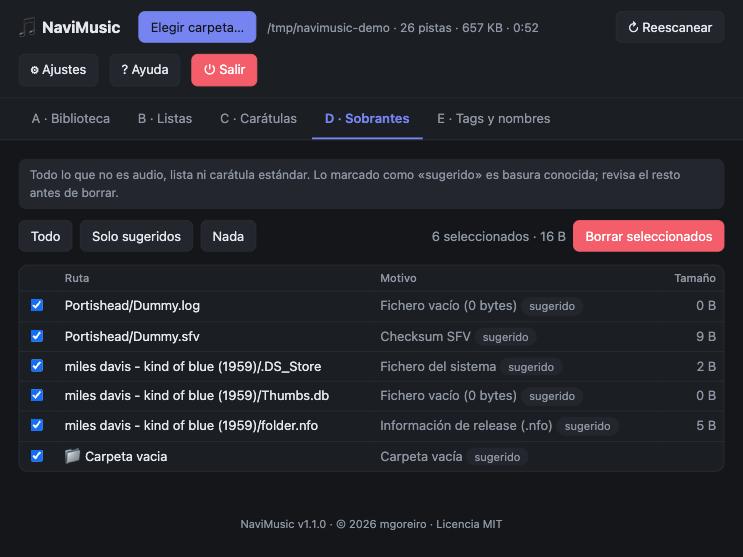
cover.jpg, searches MusicBrainz and the Cover Art Archive (or pulls out the one embedded in the file), shows you a preview and saves it. - Leftovers: the dust of a collection:
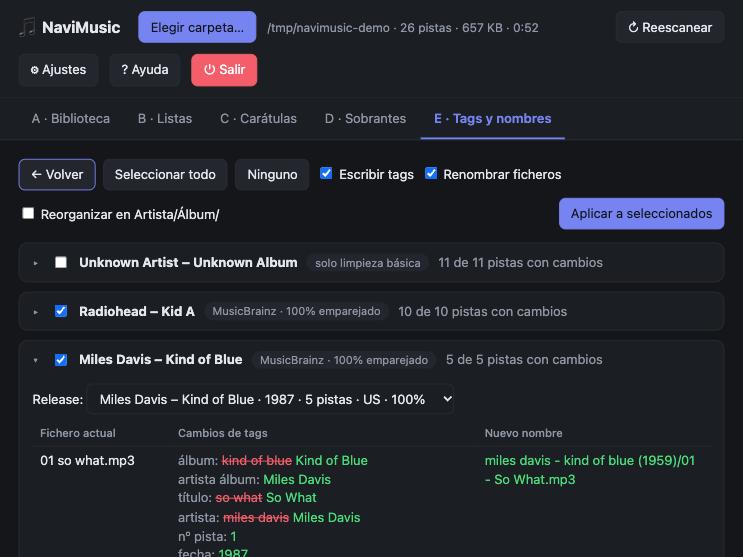
.nfo,.log,.sfv,Thumbs.db,.DS_Store, empty files and empty folders, each with a checkbox. - Tags and names: the main one. It proposes tags and file names following Navidrome’s own tagging recommendations, shows you a comparison first, and applies the change album by album.
The part that matters
For each album, NaviMusic looks the release up on MusicBrainz, by the identifiers already in your tags or by artist and album. It prefers the edition with the same number of tracks, matches your files to its tracks by title and number, and shows you what it would write: title, artist, album, album artist, track and disc number, date, the multi-value artist fields Navidrome likes, and the MusicBrainz identifiers. File names become 01 - Title.flac and, if you want, tidy Artist/Album/ folders. Albums that match well are preselected, and anything it is unsure about it only cleans lightly instead of guessing.
It reads and writes MP3, FLAC, OGG, Opus and M4A, and reads a few more.
Careful with your music
Music collections are irreplaceable in a way that makes any tool that edits them worth distrusting, so NaviMusic is cautious. The server listens only on your own machine, behind a token, and cannot touch anything outside the folder you chose. Nothing changes without you reviewing and confirming it. Deletions go to the trash unless you turn that off. Every change to the tags is written to a log. Your files never leave your computer; only artist and album names and identifiers go to MusicBrainz, at one request per second, as they ask. And still: back up before writing tags in bulk. I would.
Try it
You do not even need Python. Download the file for your system from the releases page: macOS (Apple Silicon or Intel), Windows or Linux. Unpack it and run navimusic; your browser opens at http://127.0.0.1:8765. Press Choose folder, point it at your music and scan. The executables are not signed, so your system will warn you the first time, and the README explains how to get past it. If you prefer Python, it is one command with pipx:
pipx install git+https://github.com/mgoreiro/navimusic.git
navimusic
The interface is in Spanish for now.
Honest limits
Special editions, such as deluxe and reissues, can be picked wrongly, so check the drop-down where you can change the release. WMA, WAV and AIFF can be read but not written. And it does not look for duplicate audio. It organises; it does not judge your taste.
Standing on good shoulders
NaviMusic would be nothing without MusicBrainz and the Cover Art Archive, two gifts from a community of volunteers who have catalogued the world’s music for free, and without Navidrome, which tells us so clearly what a well-kept library looks like. Tag reading and writing rely on the mutagen library. This is a small, independent project, not affiliated with any of them.
The code is on GitHub under the MIT license. Issues, ideas and pull requests are welcome.